|
 I recently installed the Windows XP SP2. Is there anything
for me to config? I recently installed the Windows XP SP2. Is there anything
for me to config?Yes. The Windows XP SP2 will automatically open the Internet connection firewall of Windows XP. So outside requests will be blocked by the firewall. Now you need to config the Internet connection firewall of Windows XP to allow WWW File Share Pro to respond outside requests. To learn how to config the Internet connection firewall of Windows XP, please click here. I have a router. Why my friends can not access my files?If you have a router, you need to config the router to redirect outside requests from the router to your computer. And you need to tell them the internet IP of the router. Please follow these steps: (Suppose that WFS Pro runs on port 80) Step 1. Please config your router, redirect outside requests to your computer. To learn how to config your router for WWW File Share Pro, please visit page, find your router, then find WWW File Share Pro from the program list: http://www.portforward.com/www-file-share-pro/ 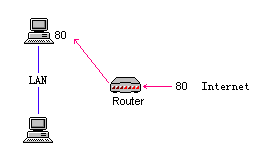 Step 2. Visit http://www.wfshome.com/myip.php to find your internet IP address. Step 3. Suppose that your local IP is 192.168.0.3 and the internet IP of your router is 142.59.46.117. Please tell http://192.168.0.3 to the LAN user and tell http://142.59.46.117 to the internet user. Do I need to install IIS or Apache first? No, WWW File Share Pro can run individually so there is no need to install any HTTP server (IIS/Apache/Pws/Tomcat/etc) on your computer. When I first attempted to use it the error message 'Please
input a valid port...' occurs. What do you consider a valid
port number?Any port number from 1 to 65535 could be valid. But it seems that another program is running on port 80 on your computer. So WWW File Share Pro can not use that port and you must choose another port number. Such as 81, 90, 2000, 3045, etc. Please change the port number on the main window of WWW File Share Pro and click the 'Start' button to try again. If you have set to start WFS Pro automatically when the computer reboots, it has already been started on your computer so you can not use that port again. Please follow these steps to check it: 1) Go to the "Settings" -> "Options" panel, clear the "Start with windows" check-box. 2) Go to the 'Settings' -> "NT service" panel, click the "Uninstall Service" button. 3) Reboot the computer. Why my friends can not see the webpage through internet?First please make sure the IP address that you told your friends is not 192.168.x.x , 127.0.x.x or 10.0.x.x. Because such IP addresses are local IP addresses that can only work on local area network. If you have a router, the router has an internet IP so you should config the router and tell the internet IP of router to your friends. Please click here to learn how. Then please check if there is any firewall software on your computer. Outside requests may be blocked by your firewall. If you find a firewall on your computer, please config the firewall to open the port for WWW File Share Pro or allow WWW File Share Pro to respond outside requests. Then please make sure that other computers can access your computer directly. 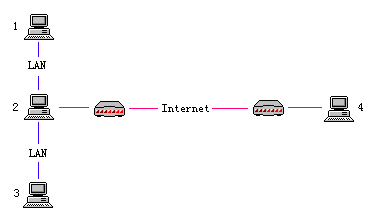 Suppose those computers all installed WWW File Share Pro, then 1) Computer 1, 2, 3 can access computer 4 2) Computer 1, 2, 3 can access each other 3) Computer 4 can only access computer 2, it can not access computer 1 and 3 directly. So if you installed WWW File Share Pro on computer 1 or 3, your friends from computer 4 can not access the resource you shared. Then please ask your friends to ping the IP address of your computer. Please ask them to open a ms-dos command window.  Then type 'ping YourIP' and then press the 'enter' key. For
example, Then type 'ping YourIP' and then press the 'enter' key. For
example, 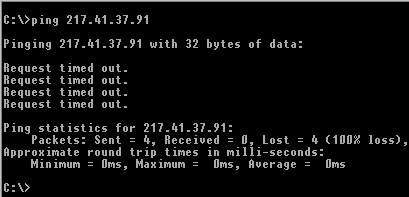 If they can only see 'Request timed out', it means that they can not access your computer directly at all. There could be firewall software on your computer, which blocks all outside requests. Or your computer doesn't connect to the internet directly. For Windows XP user: There is an Internet connection firewall on the Windows XP system. By default it is disabled. But it may be enabled so outside requests may be blocked by the firewall. To config the Internet connection firewall of Windows XP, please follow these steps: 1) Open Network Connections (Click Start, click Control Panel, and then double-click Network Connections.) 2) Click the Dial-up, LAN or High-Speed Internet connection, and then, under Network Tasks, click Change settings of this connection. 3) On the 'Advanced' tab, click the 'Settings...' button. 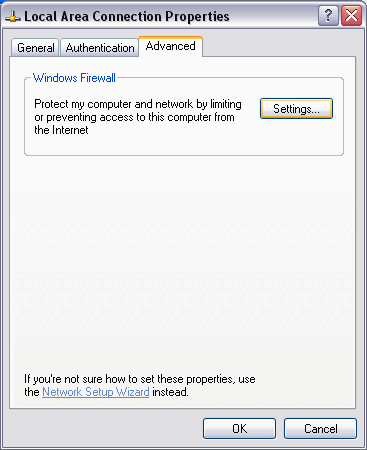 4) Click the 'Settings...' button to config the windows firewall. 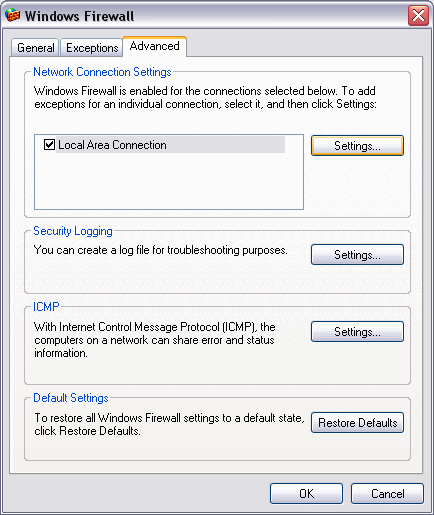 5) Click the 'Add...' button to add a service for WWW File Share Pro. 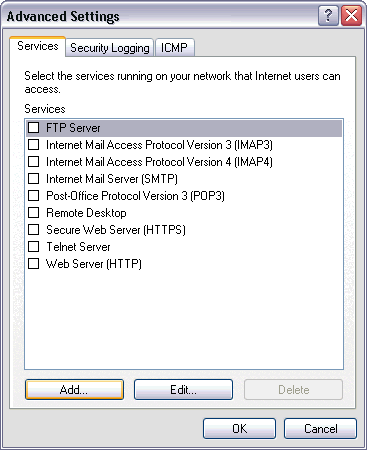 6) Input your IP address and the port number that WWW File Share Pro uses, then click the 'OK' button to save your settings. This will open the port for WWW File Share Pro and allow WWW File Share Pro to respond outside requests. 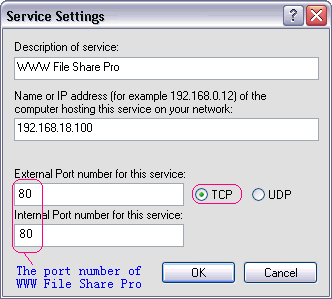 Then please try again. How to get ZoneAlarm to work with WWW File Share Pro?You must give server permission to WWW File Share Pro in the Programs List of ZoneAlarm. To learn more, please read this page. 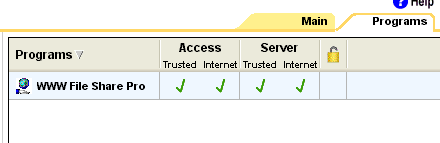 What is dynamic IP address? Can I use a domain name to instead
of the dynamic IP address? What is dynamic IP address? Can I use a domain name to instead
of the dynamic IP address? When you dial-up to Internet, or otherwise, usually you will get a dynamic IP address from ISP. It means that each time you connect to your Internet Service Provider your computer usually gets assigned a different IP address. Actually you can use a domain name to instead of your IP address. There are some software that can associate a domain name to your dynamic IP address. To find more dynamic IP address tools, please read this Resource page. Does WWW File Share Pro support resuming downloads?Yes. It supports resuming downloads. Is it possible to download more than one file at the same time?WWW File Share Pro supports multiple downloads and now there are lots of download software can do this for you. (e.g. FlashGet). For example, if you've installed FlashGet on your computer, then please right click on the html page, and then select "Download All by FlashGet" from the pop-up menu. Then you can select multiple files by FlashGet and download them at a time. To find more download tools, please read this Resource page. Is there a version for Unix or Linux?No, now WWW File Share Pro can only run on Windows system.
|